UGUI中CustomFont(BMFont)字体使用与制作
首先使用工具Bitmap Font Generator生成.fnt和图集贴图,教程参考Unity3D-使用Bitmap Font Generator自定义字体 这里主要介绍根据Text格式的.fnt和贴图 在unity中自定义字体
- 生成字体教程 上代码(Unity版本5.6.0f3) 生成字体文件后必须重启unity才能生效,否则字体文件不能正确加载(unity bug或者我没找到方法刷新unity,知道的请指教) 将脚本放在Unity工程的Editor目录下 点击Tools→BMFontTools按钮
  1
  2
  3
  4
  5
  6
  7
  8
  9
 10
 11
 12
 13
 14
 15
 16
 17
 18
 19
 20
 21
 22
 23
 24
 25
 26
 27
 28
 29
 30
 31
 32
 33
 34
 35
 36
 37
 38
 39
 40
 41
 42
 43
 44
 45
 46
 47
 48
 49
 50
 51
 52
 53
 54
 55
 56
 57
 58
 59
 60
 61
 62
 63
 64
 65
 66
 67
 68
 69
 70
 71
 72
 73
 74
 75
 76
 77
 78
 79
 80
 81
 82
 83
 84
 85
 86
 87
 88
 89
 90
 91
 92
 93
 94
 95
 96
 97
 98
 99
100
101
102
103
104
105
106
107
108
109
110
111
112
113
114
115
116
117
118
119
120
121
122
123
124
125
126
127
128
129
130
131
132
133
134
135
136
137
138
139
140
141
142
143
144
145
146
147
148
149
150
151
152
153
154
155
156
157
158
159
160
161
162
163
164
165
166
167
168
169
170
171
172
using UnityEngine;
using UnityEditor;
using System.Collections.Generic;


public class BMFontEditor : EditorWindow {
    public TextAsset fontPosTbl;
    public Texture fontTexture;
    public Vector2 scrollPos;

    struct ChrRect {
        public int id;
        public int x;
        public int y;
        public int w;
        public int h;
        public int xofs;
        public int yofs;

        public int index;
        public float uvX;
        public float uvY;
        public float uvW;
        public float uvH;
        public float vertX;
        public float vertY;
        public float vertW;
        public float vertH;
        public float width;
    }


    // add menu
    [MenuItem("Tools/BMFontTools")]
    static void Init() {
        EditorWindow.GetWindow(typeof(BMFontEditor));

    }

    // layout window
    void OnGUI() {
        //EditorGUILayout.BeginScrollView(scrollPos);
        EditorGUILayout.BeginVertical();

        // use .fnt(.txt)
        fontTexture = (Texture)EditorGUILayout.ObjectField("Font Texture", fontTexture, typeof(Texture), false);

        EditorGUILayout.Space();
        EditorGUILayout.LabelField("Use BMFont fnt File", EditorStyles.boldLabel);
        EditorGUILayout.LabelField("(must Font Descriptor select Text)", EditorStyles.boldLabel);

        fontPosTbl = (TextAsset)EditorGUILayout.ObjectField("BMFont fnt (.fnt)", fontPosTbl, typeof(TextAsset), false);
        if (GUILayout.Button("Create(创建后必须重启生效)")) {

            if (fontTexture == null) this.ShowNotification(new GUIContent("No Font Texture selected"));
            else if (fontPosTbl == null) this.ShowNotification(new GUIContent("No Font Position Table file selected"));
            else {
                CalcChrRect(fontPosTbl, fontTexture);
            }
        }
        EditorGUILayout.LabelField("(Must Restart unity  valid!)", EditorStyles.whiteBoldLabel);
        EditorGUILayout.LabelField("*********************************", EditorStyles.largeLabel);
        EditorGUILayout.EndVertical();
        //EditorGUILayout.EndScrollView();
    }

    void OnInspectorUpdate() {
        this.Repaint();
    }


    void CalcChrRect(TextAsset posTbl, Texture tex) {
        string fileName = AssetDatabase.GetAssetPath(fontPosTbl);
        string texName = AssetDatabase.GetAssetPath(tex);
        string fontName = System.IO.Path.GetFileNameWithoutExtension(fileName);
        string fontPath = fileName.Replace(".fnt", ".fontsettings");
        string matPath = fileName.Replace(".fnt", ".mat");
        float imgw = (float)tex.width;
        float imgh = (float)tex.height;
        string txt = posTbl.text;

        List<ChrRect> tblList = new List<ChrRect>();
        foreach (string line in txt.Split('\n')) {
            if (line.IndexOf("char id=") == 0) {
                ChrRect d = GetChrRect(line, imgw, imgh);
                tblList.Add(d);
            }
        }
        if(tblList.Count==0)
        {
            new GUIContent("Failed");
            return;
        }

        ChrRect[] tbls = tblList.ToArray();
        Font font = new  Font();
        font.name = fontName;
        SetCharacterInfo(tbls, font);


        Material mat = new Material(Shader.Find("Unlit/Transparent"));
        mat.mainTexture = tex;
        mat.name = fontName;
        font.material = mat;


         Debug.Log(System.IO.Path.GetFileNameWithoutExtension(fileName));
        Debug.Log(fileName);

        AssetDatabase.CreateAsset(mat, matPath);
        AssetDatabase.CreateAsset(font, fontPath);
        AssetDatabase.SaveAssets();
        this.ShowNotification(new GUIContent("Complete"));
        AssetDatabase.Refresh(ImportAssetOptions.ForceUpdate);
    }

    // over write custom font by new CharacterInfo
    void SetCharacterInfo(ChrRect[] tbls, Font fontObj) {
        CharacterInfo[] nci = new CharacterInfo[tbls.Length];
        for (int i = 0; i < tbls.Length; i++) {
            nci[i].index = tbls[i].index;
            nci[i].advance = (int)tbls[i].width;
            nci[i].uv.x = tbls[i].uvX;
            nci[i].uv.y = tbls[i].uvY;
            nci[i].uv.width = tbls[i].uvW;
            nci[i].uv.height = tbls[i].uvH;
            nci[i].vert.x = tbls[i].vertX;
            nci[i].vert.y = tbls[i].vertY;
            nci[i].vert.width = tbls[i].vertW;
            nci[i].vert.height = tbls[i].vertH;
        }
        fontObj.characterInfo = nci;
    }

    // get font table one line.
    ChrRect GetChrRect(string line, float imgw, float imgh) {
        ChrRect d = new ChrRect();

        foreach (string s in line.Split(' ')) {
            if (s.IndexOf("id=") >= 0) d.id = GetParamInt(s, "id=");
            else if (s.IndexOf("x=") >= 0) d.x = GetParamInt(s, "x=");
            else if (s.IndexOf("y=") >= 0) d.y = GetParamInt(s, "y=");
            else if (s.IndexOf("width=") >= 0) d.w = GetParamInt(s, "width=");
            else if (s.IndexOf("height=") >= 0) d.h = GetParamInt(s, "height=");
            else if (s.IndexOf("xoffset=") >= 0) d.xofs = GetParamInt(s, "xoffset=");
            else if (s.IndexOf("yoffset=") >= 0) d.yofs = GetParamInt(s, "yoffset=");
            else if (s.IndexOf("xadvance=") >= 0) d.width = GetParamInt(s, "xadvance=");
        }
        d.index = d.id;
        d.uvX = (float)d.x / imgw;
        d.uvY = (float)(imgh-(d.y)) / imgh;
        d.uvW = (float)d.w / imgw;
        //d.uvH = (float)-d.h / imgh;
        d.uvH = (float)-d.h / imgh;

        d.vertX = (float)d.xofs;
        d.vertY = (float)d.yofs;
        d.vertW = d.w;
        d.vertH = d.h;

        return d;
    }

    // "wd=int" to int
    int GetParamInt(string s, string wd) {
        if (s.IndexOf(wd) >= 0) {
            int v;
            if (int.TryParse(s.Substring(wd.Length), out v)) return v;
        }
        return int.MaxValue;
    }
}
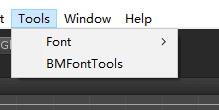
打开界面
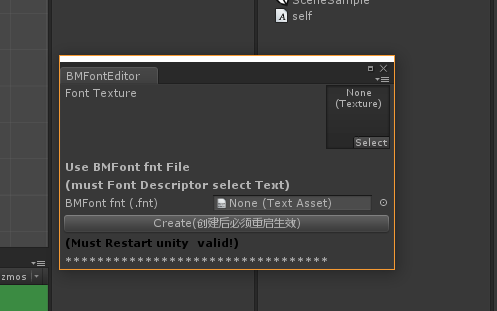
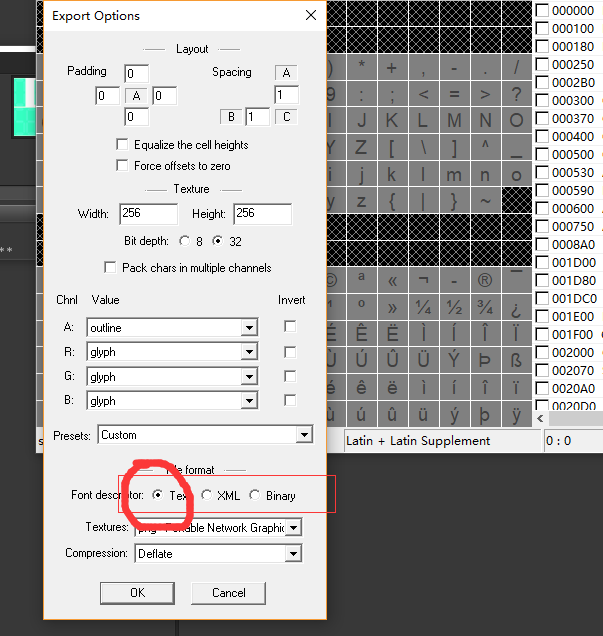
托入资源,.fnt文件必须是Text文本结构的,不能是Xml和Binary(Bitmap Font Generator在这里面配置)
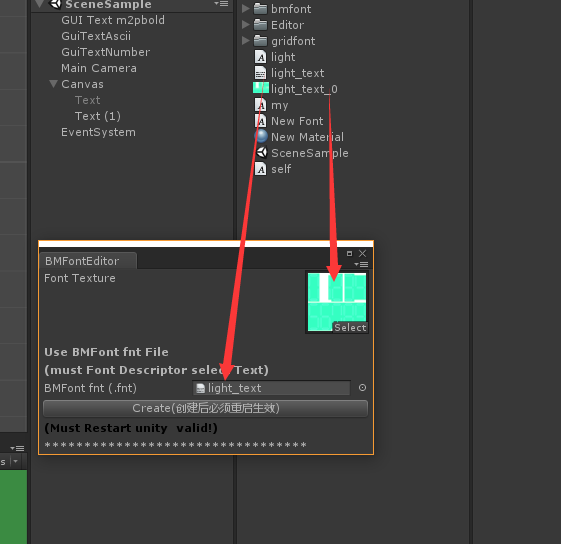
点击生成
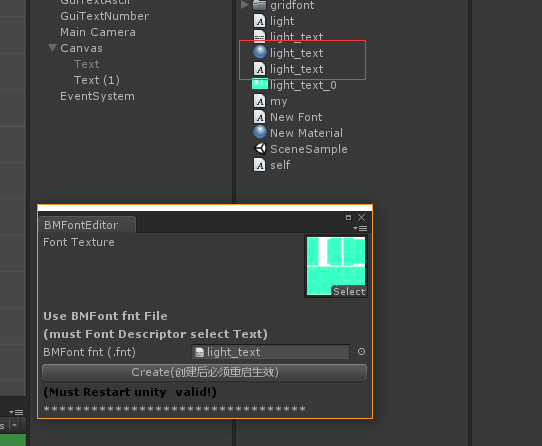
生成后必须重启unity才能生效,否则字体文件不能正确加载(unity bug或者我没找到方法刷新unity) **
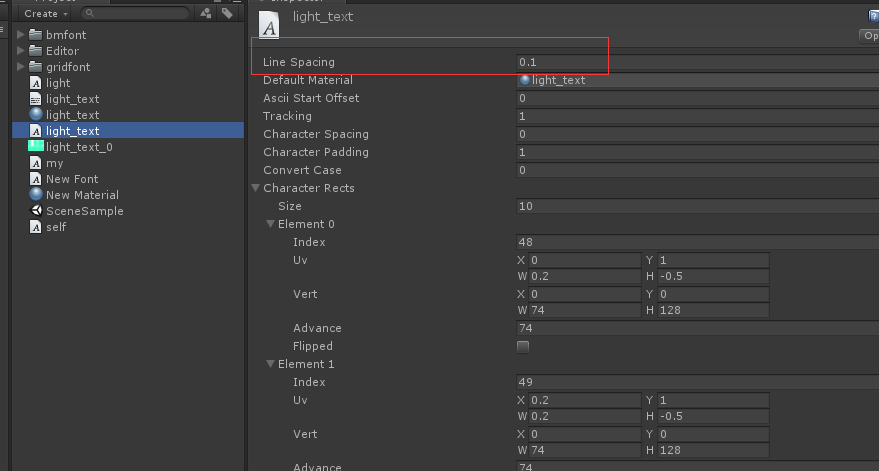
- 文字换行问题 设置字体的LineSpacing属性,为文字的高度,这里设置应该是128,一般不用