SSH笔记
ssh-keygen 基本用法
ssh-keygen命令用于为“ssh”生成、管理和转换认证密钥,它支持RSA和DSA两种认证密钥.
ssh-keygen(选项)
| -b:指定密钥长度;
-e:读取openssh的私钥或者公钥文件;
-C:添加注释;
-f:指定用来保存密钥的文件名;
-i:读取未加密的ssh-v2兼容的私钥/公钥文件,然后在标准输出设备上显示openssh兼容的私钥/公钥;
-l:显示公钥文件的指纹数据;
-N:提供一个新密语;
-P:提供(旧)密语;
-q:静默模式;
-t:指定要创建的密钥类型。
|
特别注意 -C 参数: -C:添加注释
如果在github中配置ssh 则这个参数的值必须是github的邮件名称,不能是其他的
案例:
| ssh-keygen -t rsa -f id_rsa_github -C "codingriver@163.com"
# -t 指定要创建的密钥类型
# -f 指定创建的密钥文件名字
# -C 注释 注意如果是github配置ssh,这里必须是github的邮箱名称
ssh-keygen -t ed25519 -C "codingriver@163.com"
|
验证ssh
| # 验证github ssh配置是否成功
ssh -vT git@github.com
# or
# 验证github ssh配置是否成功
ssh -vT git@github.com
|
配置ssh密钥登录
- 在本地电脑上生成密钥 生成密钥和公钥,将公钥复制到远程服务器的.ssh目录下
- 远程ssh配置
| cd ~/.ssh
ls //ls你可以看到这个文件
touch authorized_keys //生成认证文件,其实已经有了
cat id_rsa.pub >> authorized_keys // 将上面生成公钥复制到.ssh后然后复制到authorized_keys文件
chmod 600 authorized_keys //设置文件权限
chmod 700 -R .ssh //是指文件夹权限
|
- 远程sshd_config文件配置 文件位置:
/etc/ssh/sshd_config,需要使用管理员权限打开 几步处理: | //使用密钥登录
RSAAuthentication yes
PubkeyAuthentication yes
//禁止空密码和Root密码登录:
PermitEmptyPasswords no
PasswordAuthentication no
|
- ssh登录测试
| ssh -i .ssh/remote_rsa root@101.43.160.247
// - i 指定密钥的文件路径
// root 登录的用户名
// 最后是ip
|
参考 https://blog.csdn.net/ouzuosong/article/details/52225087
安装ssh https://www.cnblogs.com/wangboyu/articles/11611925.html
ssh登录
- 第一种 在命令行中指定私钥文件
| # -i 指定私钥地址(私钥和公钥的文件名是一样的,只不过公钥文件有一个 .pub 后缀名。换句话说,如果把本地公钥给删了,只剩下私钥是无法登录的,因为在登录时要将公钥id发送给服务端,这样服务端才知道要选择哪个公钥加密)
$ ssh -p 22 root@192.168.56.102 -i ~/.ssh/id_rsa_server
|
-
第二种 使用 ssh-agent 代理
| # 先添加私钥
$ ssh-add ~/.ssh/id_rsa_server
# 查看添加的私钥
$ ssh-add -l
# 使用 ssh-agent 代理,ssh-agent 会在 ssh-add 列表中寻找到合适的私钥
$ ssh root@192.168.56.102
|
-
第三种 在 SSH 配置中指定私钥文件
| $ vim ~/.ssh/config
Host gateway # 主机别名,使用 ssh gateway 命令可以直接登录该主机
Protocol 2 # SSH 协议版本
HostName example.com # 主机地址,支持IP或域名
Port 22 # SSH 服务端口号
User ubuntu # 登录用户名,会被 ssh root@gateway 覆盖,除非使用 ssh gateway
IdentityFile ~/.ssh/id_rsa # 使用的私钥文件
|
~/.ssh/config 权限: | # 为.ssh目录设置权限
chmod 600 ~/.ssh/config
|
| Host server
HostName 101.43.160.247
IdentityFile ~/.ssh/remote_rsa
User root
Port 22
ServerAliveInterval 60
ServerAliveCountMax 14400
Host remote
HostName wgqing.com
IdentityFile ~/.ssh/remote_rsa
User root
Port 22
ServerAliveInterval 60
ServerAliveCountMax 14400
|
参考:
https://zhuanlan.zhihu.com/p/257430478
https://blog.csdn.net/baalhuo/article/details/78067621
问题
关于ECDSA key fingerprint is
| mrwang@CodingdeMBP .ssh % ssh -T git@github.com
The authenticity of host 'github.com (20.205.243.166)' can't be established.
ECDSA key fingerprint is SHA256:p2QAMXNIC1TJYWeIOttrVc98/R1BUFWu3/LiyKgUfQM.
Are you sure you want to continue connecting (yes/no/[fingerprint])? yes
Warning: Permanently added 'github.com,20.205.243.166' (ECDSA) to the list of known hosts.
git@github.com: Permission denied (publickey).
mrwang@CodingdeMBP .ssh % ssh-add ~/.ssh/github
Identity added: /Users/mrwang/.ssh/github (my mac for github codingriver@163.com)
mrwang@CodingdeMBP .ssh % ssh -T git@github.com
Hi codingriver! You've successfully authenticated, but GitHub does not provide shell access.
|
ssh -T git@github.com验证报ECDSA key fingerprint is xxx 错误。 是因为新建SSH后没有开启代理 为SSH key 启用SSH代理
ssh 出现Permission denied (publickey)问题
| % git push
git@github.com: Permission denied (publickey).
fatal: Could not read from remote repository.
Please make sure you have the correct access rights
and the repository exists.
|
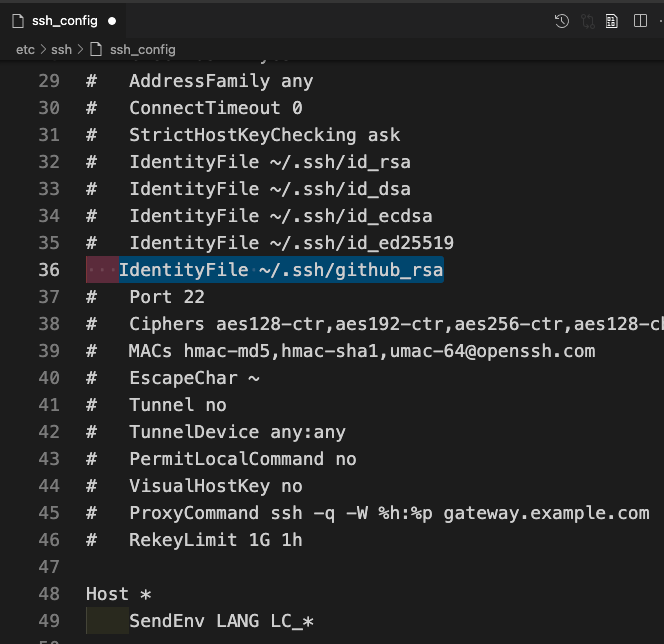
/etc/ssh/ssh_config (windows系统 C:\Program Files\Git\etc\ssh\ssh_config),添加如下一行 | IdentityFile ~/.ssh/github_rsa # github_rsa是密钥文件的名字
|
这里可能是因为我修改密钥文件名字造成的,通配符匹配不到
SSH用私钥登录远程服务器时提示私钥不安全
使用 chmod 600 id_ed25519就好了,私钥文件权限问题
| @@@@@@@@@@@@@@@@@@@@@@@@@@@@@@@@@@@@@@@@@@@@@@@@@@@@@@@@@@@
@ WARNING: UNPROTECTED PRIVATE KEY FILE! @
@@@@@@@@@@@@@@@@@@@@@@@@@@@@@@@@@@@@@@@@@@@@@@@@@@@@@@@@@@@
Permissions 0644 for '/Users/mrwang/.ssh/***' are too open.
It is required that your private key files are NOT accessible by others.
This private key will be ignored.
Load key "/Users/mrwang/.ssh/***": bad permissions
git@codeup.aliyun.com: Permission denied (publickey).
fatal: Could not read from remote repository.
Please make sure you have the correct access rights
and the repository exists.
|
ssh认证代理连接失败
需要执行下ssh-agent bash启动代理
| $ ssh -vT git@github.com
OpenSSH_9.1p1, OpenSSL 1.1.1s 1 Nov 2022
debug1: Reading configuration data /etc/ssh/ssh_config
debug1: Connecting to github.com [::1] port 22.
debug1: Connection established.
debug1: identity file /c/Users/coding/.ssh/id_rsa type -1
debug1: identity file /c/Users/coding/.ssh/id_rsa-cert type -1
debug1: identity file /c/Users/coding/.ssh/id_ecdsa type -1
debug1: identity file /c/Users/coding/.ssh/id_ecdsa-cert type -1
debug1: identity file /c/Users/coding/.ssh/id_ecdsa_sk type -1
debug1: identity file /c/Users/coding/.ssh/id_ecdsa_sk-cert type -1
debug1: identity file /c/Users/coding/.ssh/id_ed25519 type -1
debug1: identity file /c/Users/coding/.ssh/id_ed25519-cert type -1
debug1: identity file /c/Users/coding/.ssh/id_ed25519_sk type -1
debug1: identity file /c/Users/coding/.ssh/id_ed25519_sk-cert type -1
debug1: identity file /c/Users/coding/.ssh/id_xmss type -1
debug1: identity file /c/Users/coding/.ssh/id_xmss-cert type -1
debug1: identity file /c/Users/coding/.ssh/id_dsa type -1
debug1: identity file /c/Users/coding/.ssh/id_dsa-cert type -1
debug1: Local version string SSH-2.0-OpenSSH_9.1
kex_exchange_identification: Connection closed by remote host
Connection closed by ::1 port 22
$ ssh-add id_rsa_github
Could not open a connection to your authentication agent.
$ ssh-add -l
Could not open a connection to your authentication agent.
|
私钥的权限
| -rw-r--r--@ 1 mrwang staff 432 3 11 13:18 id_ed25519
-rw-r--r--@ 1 mrwang staff 113 3 11 13:18 id_ed25519.pub
-rw------- 1 mrwang staff 2602 12 19 22:37 id_rsa
-rw-r--r--@ 1 mrwang staff 573 12 19 22:37 id_rsa.pub
|
chmod 600 id_ed25519就好了,私钥文件权限问题 | -rw-r--r--@ 1 mrwang staff 627 2 12 18:52 config
-rw-------@ 1 mrwang staff 432 3 11 13:18 id_ed25519
-rw-r--r--@ 1 mrwang staff 113 3 11 13:18 id_ed25519.pub
-rw------- 1 mrwang staff 2602 12 19 22:37 id_rsa
-rw-r--r--@ 1 mrwang staff 573 12 19 22:37 id_rsa.pub
|
参考:https://my.oschina.net/philosopher/blog/314134
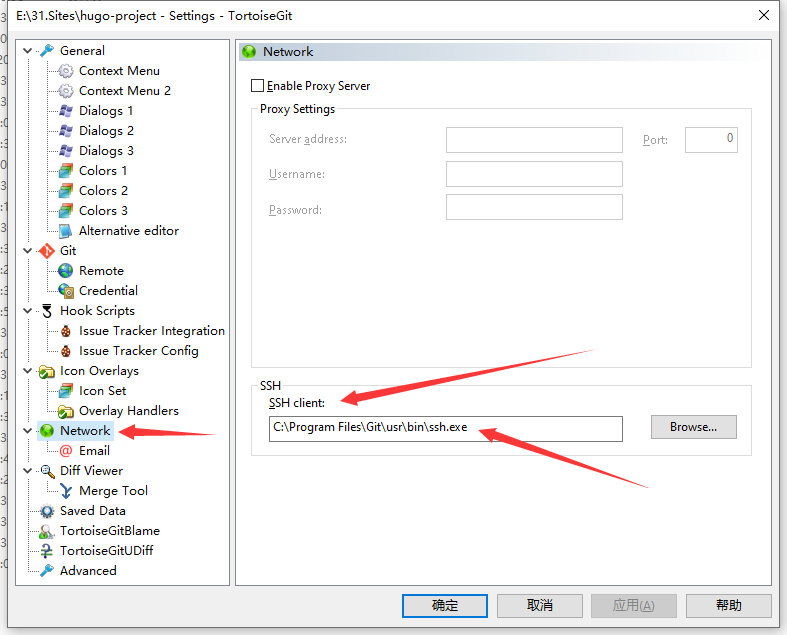
github使用ssh及小乌龟tortoisegit配置ssh的正确姿势
如果你也在使用小乌龟客户端,你可能会遇到使用SSH协议的仓库不能成功push的问题,这时你需要确保tortoisegit设置的SSH客户端是Git提供的才对。