SerializedObject获取所有属性
unity editor当使用
SerializedObject.FindProperty("属性名")获取SerializedProperty时,特别是获取私有变量时,我们不知道变量名字,基本靠公有变量转私有变量猜测变量名字来读取,这样可能有错误的情况,所以这里给出遍历打印所有属性的方法,用以排解这种问题!
另一种说法: SerializedProperty遍历SerializedObject的target的所有属性。
SerializedObject.FindProperty("属性名")的强大之处是可以获取私有变量。
使用SerializedProperty迭代器遍历对象所有属性
using UnityEngine;
using UnityEditor;
using System.Reflection;

public class TraversePropertyEditor
{
    // Start is called before the first frame update

    /// <summary>
    /// https://forum.unity.com/threads/access-lighting-window-properties-in-script.328342/
    /// </summary>
    /// <returns></returns>
    public static SerializedObject GetLighmapSettings()
    {
        var getLightmapSettingsMethod = typeof(LightmapEditorSettings).GetMethod("GetLightmapSettings",
                                                            BindingFlags.Static | BindingFlags.NonPublic);
        LightmapSettings lightmapSettings = getLightmapSettingsMethod.Invoke(null, null) as LightmapSettings;
        return new SerializedObject(lightmapSettings);
    }


    [MenuItem("Tools/TraverseProperty")]
    /// <summary>
    /// SerializedProperty遍历SerializedObject对象的所有属性
    /// </summary>
    public static void TraversePropertyNames()
    {
        SerializedObject so = GetLighmapSettings();
        SerializedProperty prop = so.GetIterator(); //获取SerializedProperty迭代器
        Debug.Log("----->>" + prop.serializedObject.targetObject.GetType().FullName);//获取target的类名(class名字)
        while (prop.Next(true))
        {
            Debug.Log(prop.name);
        }

        //SerializedProperty sp = so.FindProperty("m_LightmapEditorSettings"); //根据获取的name通过FindProperty获取该变量,

    }


}
输出:

使用SerializedProperty迭代器遍历对象及属性对象的子属性
    [MenuItem("Tools/TraverseProperty")]
    /// <summary>
    /// SerializedProperty遍历SerializedObject对象的所有属性及子属性
    /// </summary>
    public static void TraversePropertyNames()
    {
        SerializedObject so = GetLighmapSettings();
        SerializedProperty sp = so.FindProperty("m_LightmapEditorSettings");
        var prop = so.GetIterator();
        while (prop.Next(true))
        {
            Debug.Log(prop.name + "  depth=" + prop.depth + "  hasChildren=" + prop.hasChildren);
        }
    }
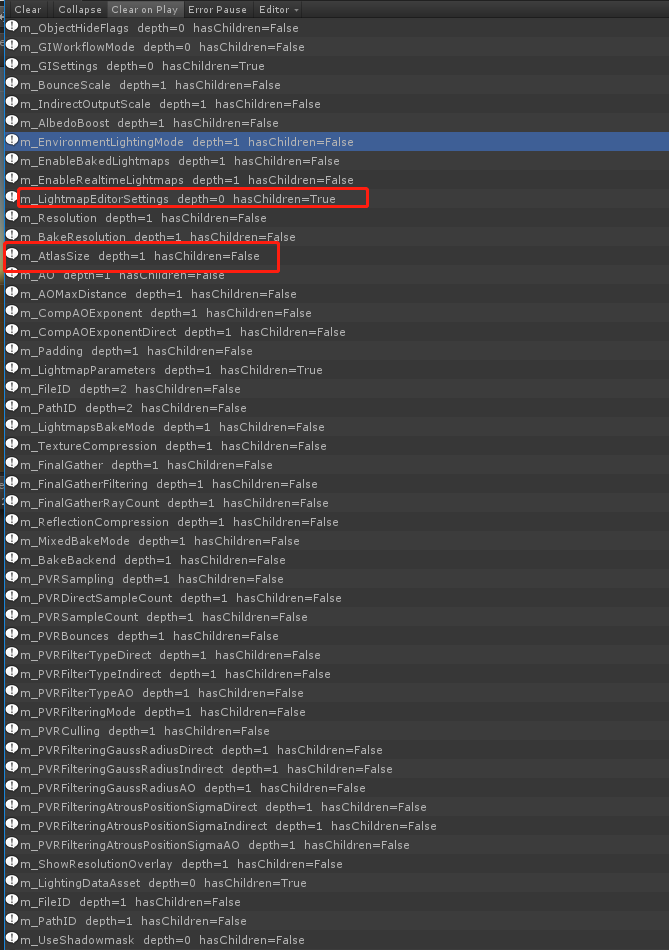
比如我们想得到:m_AtlasSize这个属性:
    public static void TraversePropertyNames()
    {
        SerializedObject so = GetLighmapSettings();
        SerializedProperty sp = so.FindProperty("m_LightmapEditorSettings");
        var prop = so.GetIterator();
        while (prop.Next(true))
        {
            //Debug.Log(prop.name + "  depth=" + prop.depth + "  hasChildren=" + prop.hasChildren);
        }
        sp = so.FindProperty("m_LightmapEditorSettings.m_AtlasSize");
        Debug.LogError(sp.name);
    }
参考文章: SerializedProperty的属性名获取