多字节大小端说明
参照深入理解计算机系统
假设变量int x = 0x01234567 假设x的指针地址为0x100,则在内存中数据存储为:
| 0x100 | 0x101 | 0x102 | 0x103 | |
|---|---|---|---|---|
| 大端法(big endian) | 01 | 23 | 45 | 67 |
| 小端法(little endian) | 67 | 45 | 23 | 01 |
可以这么记:指向地址位是数字低位为小端,指向地址位是数字高位为大端
判断本机当前环境是大端还是小端代码:
#define _CRT_SECURE_NO_WARNINGS
#include <stdio.h>

void main()
{
    int a = 0x01234567;

    //我这里输出的是67 是小端,如果是大端则输出01
    printf("%.2x\n", *(char*)(&a));

    //只是为了不让命令行关闭
    char b;
    scanf("%c", &b);


}
第二个测试
#define _CRT_SECURE_NO_WARNINGS
#include <stdio.h>

typedef unsigned char* byte_poiner;

void show_bytes(byte_poiner start, size_t len)
{
    size_t i;
    for (int i = 0; i < len; i++)
    {
        printf("%.2x", start[i]);
    }
    printf("\n");
}

void show_int(int x)
{
    show_bytes((byte_poiner)&x, sizeof(int));
}

void show_float(float x)
{
    show_bytes((byte_poiner)&x, sizeof(float));
}

void show_pointer(void* x)
{
    show_bytes((byte_poiner)&x, sizeof(void*));
}

void main()
{
    int val = 0x87654321;
    byte_poiner valp = (byte_poiner)&val;

    show_bytes(valp, 1);
    show_bytes(valp, 2);
    show_bytes(valp, 3);
    show_bytes(valp, 4);
    //只是为了不让命令行关闭
    char b;
    scanf("%c", &b);
}
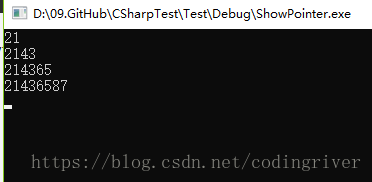
结果: